Remote Site Connection
Context
Integration of a remote site into the existing information system via site-to-site VPN, with deployment of a Read-Only Domain Controller (RODC) and application of Group Policies.
Objectives
- Configure a site-to-site IPsec VPN with pfSense
- Deploy a RODC (Read-Only Domain Controller)
- Extend Active Directory to the remote site
- Apply GPOs adapted to the remote context
- Set up automated backups
Technologies Used
- pfSense: firewall and IPsec VPN
- Windows Server: AD DS, RODC
- Active Directory: centralized identity management
- GPO: Group Policies
- PowerShell: backup scripts (Robocopy)
- VMware: virtualization
Architecture
    Main Site                         Remote Site
   +-------------+                  +-------------+
   |     DC      |                  |    RODC     |
   |  (AD DS)    |                  |  (Read      |
   +------+------+                  |   Only)     |
          |                         +------+------+
   +------v------+    VPN IPsec    +------v------+
   |   pfSense   |<--------------->|   pfSense   |
   +-------------+                  +-------------+
Deliverables
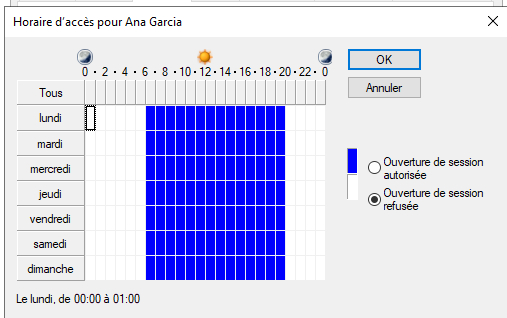
GPO Work Hours Script (PowerShell)
<#
.DESCRIPTION
    Script to set login hours from 6am to 8pm every day of the week
.NOTES
    Creation date: 17/03/2025
.AUTHOR
    BENE Mael
.VERSION
    1.0
#>

# Recursive retrieval of users (includes subgroup members)
$users = Get-ADGroupMember -Identity OpenBank -Recursive | Select-Object -ExpandProperty SamAccountName

# Create 21-byte array (168 hours in a week)
$LogonHours = New-Object byte[] 21

# Sunday = index 0, Monday = index 1, ..., Saturday = index 6
# Set login hours (6am to 8pm) for all days of the week

for ($day = 0; $day -le 6; $day++) {  # Sunday (0) to Saturday (6)
    for ($hour = 5; $hour -lt 19; $hour++) {  # From 6am to 8pm
        $byteIndex = [math]::Floor(($day * 24 + $hour) / 8)
        $bitIndex = ($day * 24 + $hour) % 8
        $LogonHours[$byteIndex] = $LogonHours[$byteIndex] -bor (1 -shl $bitIndex)
    }
}

# Apply restriction to user
foreach ($user in $users)
{
    Set-ADUser -Identity $user -Replace @{logonHours=$LogonHours}
}
GPO Work Hours Screenshot
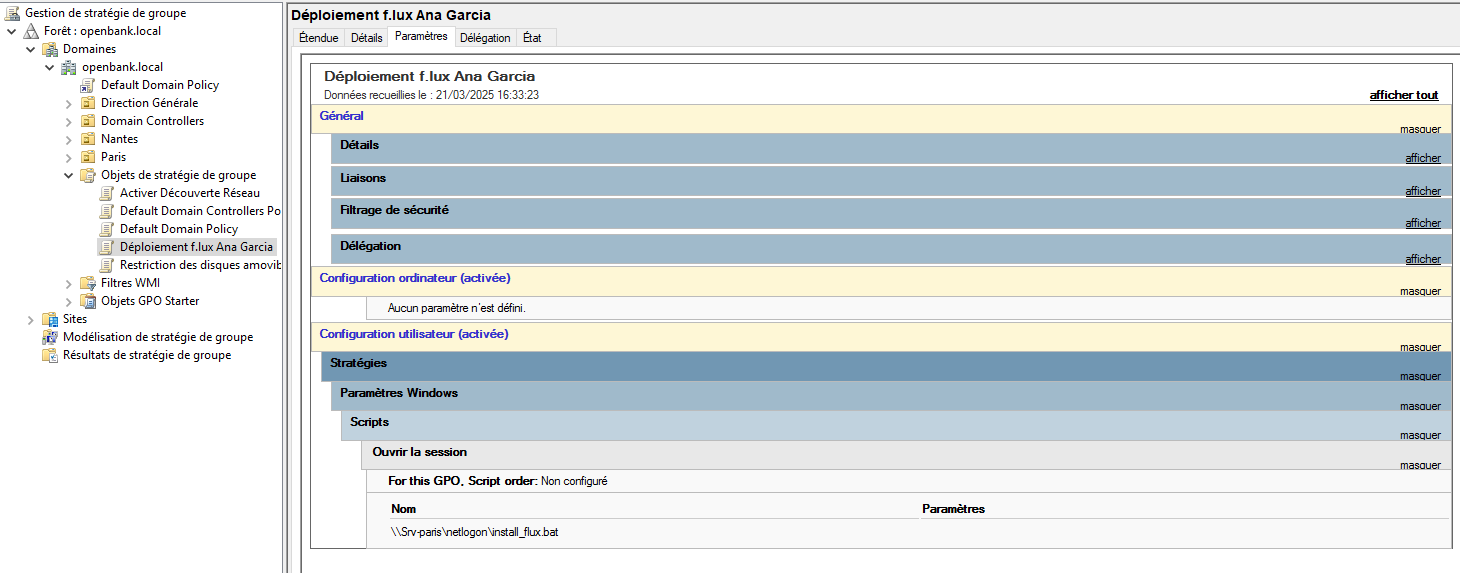
GPO Flux Installation Script (Batch)
@echo off
REM User verification
if "%username%"=="agarcia" (
    echo Installing flux-setup.exe for %username%
    winget install -e --id flux.flux --silent --accept-package-agreements --accept-source-agreements
) else (
    echo Installation not applicable for this user.
    exit /b
)
GPO Flux Installation Screenshot
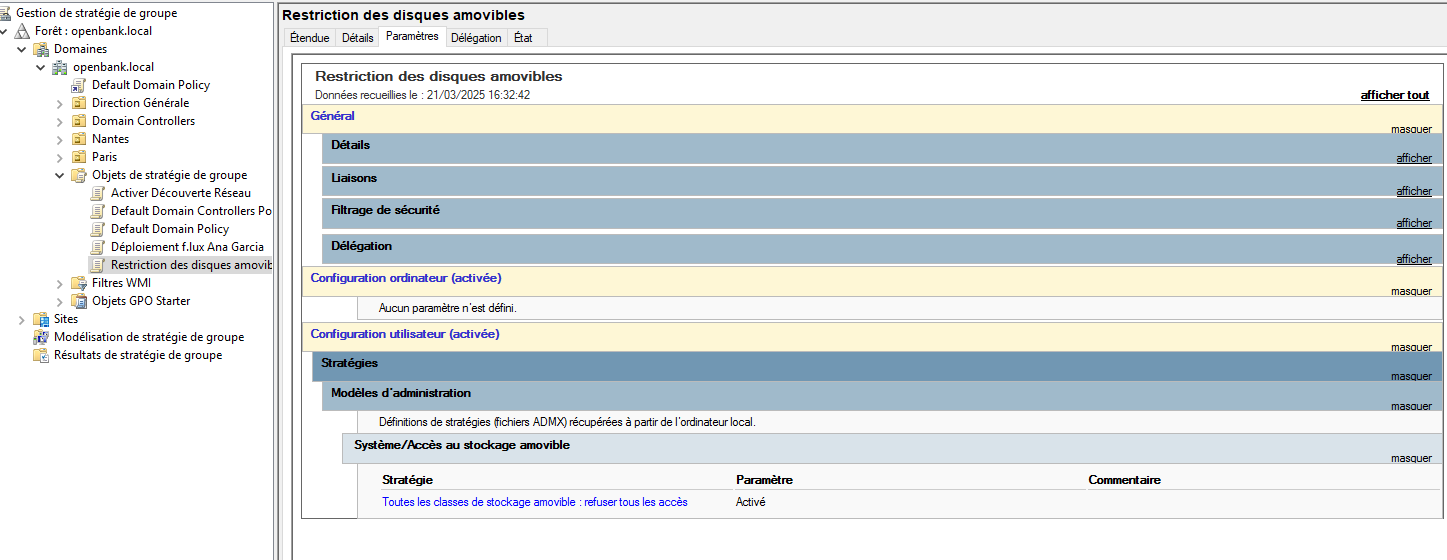
GPO Removable Disk Restriction Screenshot
pfSense Nantes VPN Configuration (XML)
<ipsec>
	<client></client>
	<phase1>
		<ikeid>1</ikeid>
		<iketype>ikev2</iketype>
		<interface>opt1</interface>
		<remote-gateway>194.0.0.1</remote-gateway>
		<protocol>inet</protocol>
		<myid_type>address</myid_type>
		<myid_data>194.0.0.2</myid_data>
		<peerid_type>address</peerid_type>
		<peerid_data>194.0.0.1</peerid_data>
		<encryption>
			<item>
				<encryption-algorithm>
					<name>aes</name>
					<keylen>256</keylen>
				</encryption-algorithm>
				<hash-algorithm>sha256</hash-algorithm>
				<prf-algorithm>sha256</prf-algorithm>
				<dhgroup>14</dhgroup>
			</item>
		</encryption>
		<lifetime>28800</lifetime>
		<pre-shared-key>bc4b31bbe6ac6eba857a44b8941ed31389cdb6c678635384b676ae34</pre-shared-key>
		<authentication_method>pre_shared_key</authentication_method>
		<descr><![CDATA[Tunnel to Paris]]></descr>
		<nat_traversal>on</nat_traversal>
		<mobike>off</mobike>
		<dpd_delay>10</dpd_delay>
		<dpd_maxfail>5</dpd_maxfail>
	</phase1>
	<phase2>
		<ikeid>1</ikeid>
		<uniqid>67cf001195fba</uniqid>
		<mode>tunnel</mode>
		<reqid>1</reqid>
		<localid>
			<type>network</type>
			<address>10.0.2.0</address>
			<netbits>24</netbits>
		</localid>
		<remoteid>
			<type>network</type>
			<address>10.0.1.0</address>
			<netbits>24</netbits>
		</remoteid>
		<protocol>esp</protocol>
		<encryption-algorithm-option>
			<name>aes</name>
			<keylen>256</keylen>
		</encryption-algorithm-option>
		<hash-algorithm-option>hmac_sha256</hash-algorithm-option>
		<pfsgroup>14</pfsgroup>
		<lifetime>3600</lifetime>
		<pinghost>10.0.1.1</pinghost>
		<keepalive>disabled</keepalive>
		<descr><![CDATA[LAN Paris-Nantes traffic]]></descr>
	</phase2>
</ipsec>
pfSense Paris VPN Configuration (XML)
<ipsec>
	<client></client>
	<phase1>
		<ikeid>1</ikeid>
		<iketype>ikev2</iketype>
		<interface>opt1</interface>
		<remote-gateway>194.0.0.2</remote-gateway>
		<protocol>inet</protocol>
		<myid_type>address</myid_type>
		<myid_data>194.0.0.1</myid_data>
		<peerid_type>address</peerid_type>
		<peerid_data>194.0.0.2</peerid_data>
		<encryption>
			<item>
				<encryption-algorithm>
					<name>aes</name>
					<keylen>256</keylen>
				</encryption-algorithm>
				<hash-algorithm>sha256</hash-algorithm>
				<prf-algorithm>sha256</prf-algorithm>
				<dhgroup>14</dhgroup>
			</item>
		</encryption>
		<lifetime>28800</lifetime>
		<pre-shared-key>bc4b31bbe6ac6eba857a44b8941ed31389cdb6c678635384b676ae34</pre-shared-key>
		<authentication_method>pre_shared_key</authentication_method>
		<descr><![CDATA[Tunnel to Nantes]]></descr>
		<nat_traversal>on</nat_traversal>
		<mobike>off</mobike>
		<dpd_delay>10</dpd_delay>
		<dpd_maxfail>5</dpd_maxfail>
	</phase1>
	<phase2>
		<ikeid>1</ikeid>
		<uniqid>67ceff22aa6e4</uniqid>
		<mode>tunnel</mode>
		<reqid>1</reqid>
		<localid>
			<type>network</type>
			<address>10.0.1.0</address>
			<netbits>24</netbits>
		</localid>
		<remoteid>
			<type>network</type>
			<address>10.0.2.0</address>
			<netbits>24</netbits>
		</remoteid>
		<protocol>esp</protocol>
		<encryption-algorithm-option>
			<name>aes</name>
			<keylen>256</keylen>
		</encryption-algorithm-option>
		<hash-algorithm-option>hmac_sha256</hash-algorithm-option>
		<pfsgroup>14</pfsgroup>
		<lifetime>3600</lifetime>
		<pinghost>10.0.2.1</pinghost>
		<keepalive>disabled</keepalive>
		<descr><![CDATA[LAN Paris-Nantes traffic]]></descr>
	</phase2>
</ipsec>
PowerShell Backup Script (Robocopy)
<#
.DESCRIPTION
    Script to copy data from drive D to G:\Mon Drive\projet6
.NOTES
    Creation date: 17/03/2025
.AUTHOR
    BENE Mael
.VERSION
    1.1
#>

# Source and destination paths
$SourcePath = "D:\"
$DestinationPath = "G:\Mon Drive\projet6"

# Copy files with Robocopy
Write-Host "Copying data from $SourcePath to $DestinationPath..." -ForegroundColor Cyan

try {
    Robocopy.exe "$SourcePath" "$DestinationPath" /E /COPY:DAT /R:2 /W:5 /MT:8 /XD "System Volume Information" "$RECYCLE.BIN" "Recovery"  # Added exceptions for system files

    # Detailed result display
    switch ($LASTEXITCODE) {
        0 { Write-Host "No files copied - All files were already synchronized." -ForegroundColor Green }
        1 { Write-Host "Files copied successfully." -ForegroundColor Green }
        2 { Write-Host "Additional files detected." -ForegroundColor Yellow }
        4 { Write-Host "Mismatched files detected." -ForegroundColor Yellow }
        8 { Write-Host "Copy errors detected." -ForegroundColor Red }
        16 { Write-Host "Serious copy error." -ForegroundColor Red }
        default { Write-Host "Robocopy exit code: $LASTEXITCODE" -ForegroundColor Magenta }
    }

} catch {
    Write-Host "Error executing Robocopy: $_" -ForegroundColor Red
}

Write-Host "Operation completed." -ForegroundColor Cyan
Skills Acquired
- Site-to-site IPsec VPN tunnel configuration
- RODC deployment and management
- Active Directory infrastructure extension
- GPO design for remote sites
- Backup automation with PowerShell