ZFS Replication and Highly Available NFS Server
Documentation of my hybrid storage infrastructure: Linstor DRBD distributed storage for VMs, and active-passive ZFS replication for cold data with a highly available NFS server.
Context and Problem Statement
Hybrid Storage Architecture
My Proxmox cluster uses two types of storage with different needs and constraints:
High-Performance Storage for VM/LXC: Linstor DRBD
- Usage: System disks for virtual machines and containers
- Requirements: Synchronous replication, live migration, RPO ~0
- Support: NVMe SSDs on Proxmox nodes
- Technology: Linstor DRBD (see blog post on distributed storage)
Cold Data Storage: Replicated ZFS
- Usage: Media, user files, Proxmox Backup Server backups
- Requirements: Large capacity, data integrity, high availability but live migration not required
- Support: USB drives on Proxmox nodes (independent ZFS pools)
- Technology: Active-passive ZFS replication with Sanoid/Syncoid
Why Not Use Linstor DRBD for Everything?
Synchronous distributed storage like Linstor DRBD has several constraints for cold data:
- Write Performance: Every write must be confirmed on multiple nodes, penalizing large file transfers
- Network Consumption: Synchronous replication would saturate the 1 Gbps network during massive transfers
- Unnecessary Complexity: Cold data doesn't need live migration or near-zero RPO
- Cost/Benefit: Resource over-consumption for a need that can be satisfied by asynchronous replication
The Solution: Active-Passive ZFS Replication
For cold data, asynchronous snapshot-based replication offers the best compromise:
| Criteria | Linstor DRBD | Replicated ZFS |
|---|---|---|
| Replication Type | Synchronous | Asynchronous (snapshots) |
| Network Overhead | High (continuous) | Low (periodic) |
| RPO | ~0 | Snapshot interval (10 min) |
| Live Migration | Yes | Not necessary |
| Data Integrity | Good | Excellent (ZFS checksums) |
| Suited for | VM/LXC system | Large cold data |
An RPO of 10 minutes is perfectly acceptable for media and user files: in case of node failure, only changes from the last 10 minutes could be lost.
Architecture
Overview
┌─────────────────────────────────────────────────────────────┐
│                    Proxmox HA Cluster                       │
│                                                             │
│  ┌──────────────────┐              ┌──────────────────┐   │
│  │  acemagician     │              │   elitedesk      │   │
│  │                  │◄────────────►│                  │   │
│  │  - zpool1 (10TB) │ Replication  │  - zpool1 (10TB) │   │
│  │  - zpool2 (2TB)  │   Sanoid/    │  - zpool2 (2TB)  │   │
│  │                  │   Syncoid    │                  │   │
│  └────────┬─────────┘              └─────────┬────────┘   │
│           │                                  │            │
│           │         ┌──────────────┐         │            │
│           └────────►│  LXC 103     │◄────────┘            │
│                     │  NFS Server  │                      │
│                     │  (rootfs on  │                      │
│                     │   DRBD)      │                      │
│                     └──────┬───────┘                      │
└────────────────────────────┼──────────────────────────────┘
                             │
                             ▼
                    NFS Clients (VMs)
                    192.168.100.0/24
Components
ZFS Pools on Proxmox Nodes
Each node has two independent ZFS pools:
zpool1 (~10 TB): Large data
zpool1/data-nfs-share: Main NFS share (6.83 TB used)zpool1/pbs-backups: Proxmox Backup Server backups
zpool2 (~2 TB): Media and files
zpool2/photos: Photo library (14.7 GB)zpool2/storage: Miscellaneous files (19.1 GB)
Pool status on nodes:
# Node acemagician
root@acemagician:~# zfs list
NAME                    USED  AVAIL  REFER  MOUNTPOINT
zpool1                 7.83T  2.95T   104K  /zpool1
zpool1/data-nfs-share  6.83T  2.95T  6.79T  /zpool1/data-nfs-share
zpool1/pbs-backups       96K  1024G    96K  /zpool1/pbs-backups
zpool2                 33.9G  1.72T   104K  /zpool2
zpool2/photos          14.7G  1.72T  12.7G  /zpool2/photos
zpool2/storage         19.1G  1.72T  19.1G  /zpool2/storage

# Node elitedesk
root@elitedesk:~# zfs list
NAME                    USED  AVAIL  REFER  MOUNTPOINT
zpool1                 7.83T  2.97T    96K  /zpool1
zpool1/data-nfs-share  6.83T  2.97T  6.79T  /zpool1/data-nfs-share
zpool1/pbs-backups       96K  1024G    96K  /zpool1/pbs-backups
zpool2                 33.9G  1.72T   112K  /zpool2
zpool2/photos          14.7G  1.72T  12.7G  /zpool2/photos
zpool2/storage         19.1G  1.72T  19.1G  /zpool2/storage
Note that pools are perfectly synchronized between the two nodes, with identical sizes for each dataset.
Pools are identical on both nodes thanks to automatic bidirectional replication. The active node (hosting the LXC) is always the master.
LXC 103: Highly Available NFS Server
The LXC 103 container acts as an NFS server with the following characteristics:
- Rootfs on Linstor DRBD: Enables high availability via Proxmox HA
- ZFS Dataset Mounting: Direct access to host node pools via bind mount
- NFS Service: Exposes datasets via NFS to network clients
- Automatic Failover: In case of failure, Proxmox HA restarts the LXC on the other node (~60s downtime)
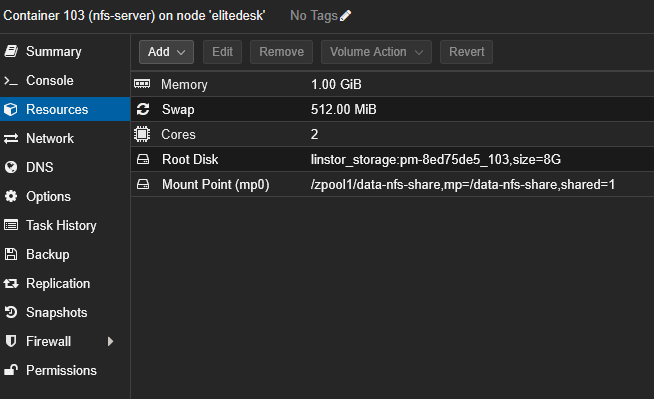
Detailed configuration:
- CPU: 2 cores
- RAM: 1 GB (+ 512 MB swap)
- Rootfs: 8 GB on
linstor_storage(DRBD distributed storage) - Mount Point (mp0):
/zpool1/data-nfs-share,mp=/data-nfs-share,shared=1
The shared=1 option is mandatory for the ZFS dataset bind mount. This option tells Proxmox VE that this storage is shared across cluster nodes, allowing High Availability (HA) to work properly without being blocked.
The NFS container rootfs is stored on Linstor DRBD to benefit from Proxmox high availability. This allows the LXC to automatically fail over to the other node in case of failure, with only about 60 seconds of downtime.
Without shared/distributed storage, Proxmox HA couldn't automatically migrate the container, requiring manual intervention.
Automatic Replication Script
The zfs-nfs-replica.sh script runs every 10 minutes via a systemd timer and implements the following logic:
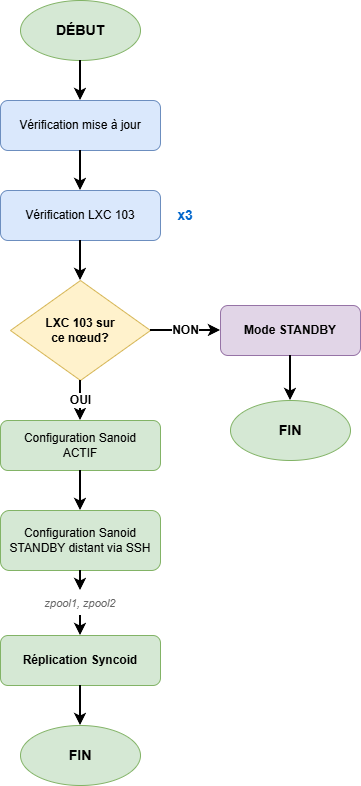
- Automatic Master Detection: The node hosting LXC 103 automatically becomes the master
- Dynamic Sanoid Configuration:
- Master Node:
autosnap=yes,autoprune=yes(snapshot creation) - Standby Node:
autosnap=no,autoprune=yes(receive only)
- Master Node:
- Replication via Syncoid: Incremental transfer of snapshots from master to standby
- Security Checks:
- Triple verification that the correct node is master
- Size comparison to detect empty replacement disk
- Size history to prevent accidental overwrites
Technical Operation
Automatic Master Node Detection
The script determines which node hosts LXC 103:
# Detect active node
ACTIVE_NODE=$(pvesh get /cluster/resources --type vm --output-format json | \
  jq -r '.[] | select(.vmid==103) | .node')

# Compare with local node
CURRENT_NODE=$(hostname)

if [ "$ACTIVE_NODE" = "$CURRENT_NODE" ]; then
  # This node is the master
  configure_as_master
else
  # This node is on standby
  configure_as_standby
fi
This detection ensures the system automatically adapts to LXC migrations, whether planned (maintenance) or automatic (Proxmox HA failover).
Dynamic Sanoid Configuration
Sanoid is configured differently based on node role:
Master Node (hosts LXC 103)
[zpool1/data-nfs-share]
  use_template = production
  recursive = yes
  autosnap = yes        # Automatic snapshot creation
  autoprune = yes       # Old snapshot cleanup

[zpool2/photos]
  use_template = production
  recursive = yes
  autosnap = yes
  autoprune = yes

[zpool2/storage]
  use_template = production
  recursive = yes
  autosnap = yes
  autoprune = yes
Standby Node
[zpool1/data-nfs-share]
  use_template = production
  recursive = yes
  autosnap = no         # No snapshot creation
  autoprune = yes       # Old snapshot cleanup

[zpool2/photos]
  use_template = production
  recursive = yes
  autosnap = no
  autoprune = yes

[zpool2/storage]
  use_template = production
  recursive = yes
  autosnap = no
  autoprune = yes
Replication with Syncoid
Syncoid performs incremental snapshot replication from master to standby:
# Replicate each dataset
syncoid --no-sync-snap --recursive \
  root@master:zpool1/data-nfs-share \
  zpool1/data-nfs-share

syncoid --no-sync-snap --recursive \
  root@master:zpool2/photos \
  zpool2/photos

syncoid --no-sync-snap --recursive \
  root@master:zpool2/storage \
  zpool2/storage
The --no-sync-snap option avoids creating an additional sync snapshot, using only existing Sanoid snapshots.
Security Mechanisms
The script implements several checks to prevent data loss:
Triple Replication Direction Verification
Before each replication, the script verifies three times that:
- LXC 103 is on the local node
- The local node is the master
- Sanoid configuration is in master mode
If any of these checks fails, replication is aborted to prevent replication in the wrong direction.
Empty Disk Protection
Before replicating, the script compares dataset sizes:
# Get sizes
SOURCE_SIZE=$(ssh root@master "zfs get -Hp -o value used zpool1/data-nfs-share")
TARGET_SIZE=$(zfs get -Hp -o value used zpool1/data-nfs-share)

# If source is significantly smaller than target
if [ $SOURCE_SIZE -lt $(($TARGET_SIZE / 2)) ]; then
  echo "ERROR: Suspicious source size, empty replacement disk?"
  exit 1
fi
This prevents an empty replacement disk from overwriting standby data.
Size History
The script maintains a dataset size history to detect abnormal variations (sudden size drop indicating a problem).
NFS Configuration
NFS Exports on LXC 103
The /etc/exports file defines NFS shares:
# zpool2 pools exposed to specific VM (192.168.100.250)
/zpool2         192.168.100.250(sync,wdelay,hide,crossmnt,no_subtree_check,sec=sys,rw,secure,no_root_squash,no_all_squash)
/zpool2/photos  192.168.100.250(sync,wdelay,hide,crossmnt,no_subtree_check,sec=sys,rw,secure,no_root_squash,no_all_squash)
/zpool2/storage 192.168.100.250(sync,wdelay,hide,crossmnt,no_subtree_check,sec=sys,rw,secure,no_root_squash,no_all_squash)

# Main share accessible to entire network
/data-nfs-share 192.168.100.0/24(sync,wdelay,hide,no_subtree_check,sec=sys,rw,insecure,no_root_squash,no_all_squash)
NFS Options Explained
| Option | Description |
|---|---|
sync | Confirms writes only after disk commit (integrity) |
wdelay | Groups writes to improve performance |
hide | Hides sub-mounts from NFS v3 clients |
crossmnt | Allows crossing mounts (useful with ZFS datasets) |
no_subtree_check | Disables subtree checking (performance) |
rw | Read/write |
secure | Requires requests from ports < 1024 (security) |
insecure | Allows ports > 1024 (necessary for some clients) |
no_root_squash | Preserves root permissions (avoids mapping to nobody) |
no_all_squash | Preserves user UIDs/GIDs |
The no_root_squash option allows NFS clients to perform operations as root. This is acceptable in a trusted home network (192.168.100.0/24), but would constitute a major security risk on an untrusted network.
Systemd Services
Active NFS services on LXC:
nfs-server.service      enabled    # Main NFS server
nfs-blkmap.service      enabled    # pNFS block layout support
nfs-client.target       enabled    # Target for NFS clients
nfs-exports-update.timer enabled   # Automatic export updates
Network Ports
NFS listening ports:
2049/tcp  # NFSv4 (main)
111/tcp   # Portmapper (rpcbind)
Client-Side NFS Mounting
/etc/fstab Configuration
To automatically mount the NFS share on VM or container boot, add the following entry to /etc/fstab:
192.168.100.150:/data-nfs-share /mnt/storage nfs hard,intr,timeo=100,retrans=30,_netdev,nofail,x-systemd.automount 0 0
This configuration is used on my Docker Compose & Ansible production VM which hosts all my containerized services.
Mount Options Explained
| Option | Description |
|---|---|
hard | In case of NFS server unavailability, I/O operations are blocked waiting rather than failing (ensures integrity) |
intr | Allows interrupting blocked I/O operations with Ctrl+C (useful in case of network issues) |
timeo=100 | 10-second timeout (100 tenths of a second) before retry |
retrans=30 | Number of retransmissions before declaring error (30 × 10s = 5 minutes of retry) |
_netdev | Indicates mount requires network (systemd waits for network connectivity) |
nofail | Doesn't prevent boot if mount fails (avoids boot blocking) |
x-systemd.automount | Automatic mount on first use (avoids blocking boot) |
0 0 | No dump or fsck (not applicable for NFS) |
Behavior During NFS Failover
Thanks to hard and retrans=30 options, during NFS server failover (~60 seconds):
- During Failover: Ongoing I/O operations are suspended (hard mount)
- Automatic Retry: NFS client retries for 5 minutes (30 × 10s)
- Transparent Recovery: As soon as NFS server restarts on the other node, I/O operations resume automatically
- No Intervention: Applications don't need to restart or remount the share
The retry time (5 minutes) is well above the NFS server RTO (~60 seconds), ensuring clients survive failover without errors.
Manual Mounting
To temporarily mount the NFS share:
# Create mount point
mkdir -p /mnt/storage

# Manual mount
mount -t nfs -o hard,intr,timeo=100,retrans=30 \
  192.168.100.150:/data-nfs-share /mnt/storage

# Verify mount
df -h /mnt/storage
mount | grep nfs
Verify Automatic Mounting
# Reload systemd to account for fstab
systemctl daemon-reload

# Test mount without reboot
mount -a

# Verify mount is active
systemctl status mnt-storage.mount

# Display NFS statistics
nfsstat -m
High Availability and Failover Time
HA Architecture Thanks to Linstor DRBD
The NFS server benefits from Proxmox high availability thanks to LXC 103 rootfs stored on Linstor DRBD:
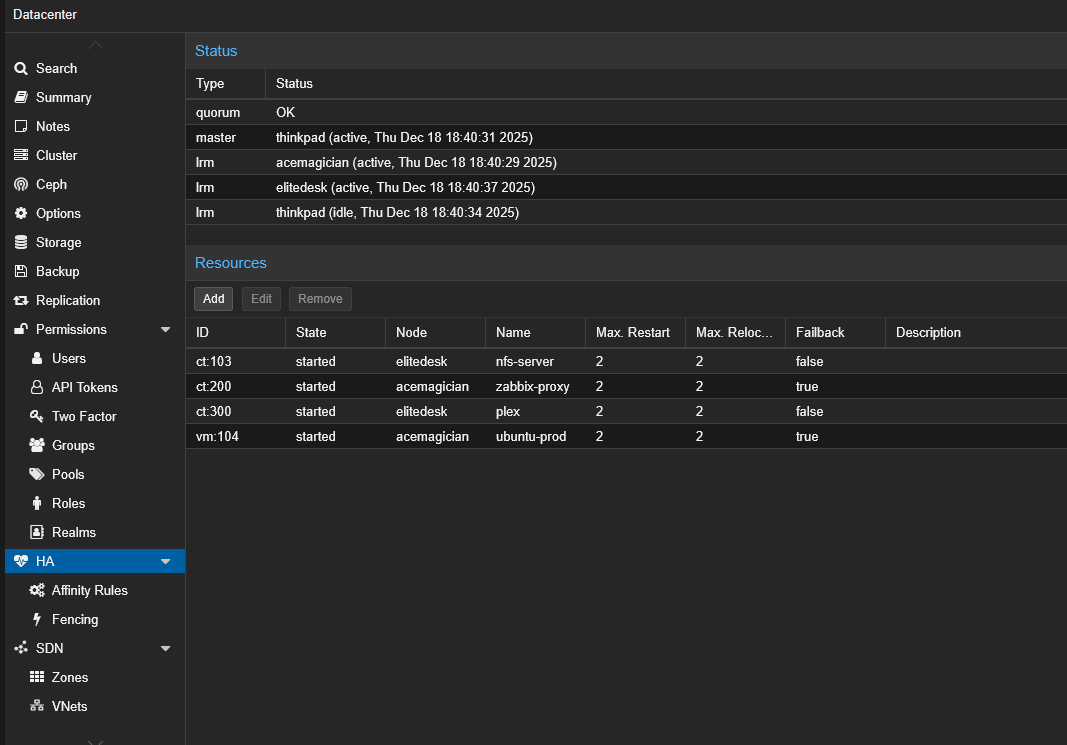
The screenshot above shows the Proxmox HA configuration of the NFS server:
- LXC 103 (nfs-server): HA resource with Max. Restart = 2, currently hosted on
elitedesknode - The LXC can automatically restart on the other node in case of failure, thanks to its rootfs on shared DRBD storage
Failure Scenario: Automatic Failover
In case of failure of a node hosting LXC 103:
- Detection (5-10s): Proxmox HA Manager detects node failure via quorum
- Decision (1-2s): HA Manager decides to restart LXC on surviving node
- Storage Migration (0s): DRBD rootfs is already replicated and accessible on the other node
- LXC Startup (40-50s): LXC starts on new node
- ZFS Mount and NFS Start (5-10s): Local ZFS datasets are mounted and NFS service starts
Total failover time: ~60 seconds
- RPO (Recovery Point Objective): 10 minutes (ZFS replication interval)
- RTO (Recovery Time Objective): ~60 seconds (LXC failover time)
These values are widely acceptable for a cold data NFS server in a homelab context.
Automatic Replication Adaptation
After LXC failover to the other node:
- The replication script detects LXC is now on the new node
- Sanoid configuration is automatically reversed:
- The former master becomes standby (autosnap=no)
- The new master becomes active (autosnap=yes)
- Replication now occurs in the opposite direction
No manual intervention required.
Installation and Deployment
Prerequisites
- Proxmox cluster with at least 2 nodes
- Identical ZFS pools on each node
- LXC with rootfs on shared/distributed storage (Linstor DRBD)
- Sanoid and Syncoid installed on Proxmox nodes
- SSH access between nodes (SSH keys configured)
Script Installation
# On each Proxmox node

# 1. Clone Git repository
cd /tmp
git clone https://forgejo.tellserv.fr/Tellsanguis/zfs-sync-nfs-ha.git
cd zfs-sync-nfs-ha

# 2. Install script
cp zfs-nfs-replica.sh /usr/local/bin/
chmod +x /usr/local/bin/zfs-nfs-replica.sh

# 3. Install systemd services
cp zfs-nfs-replica.service /etc/systemd/system/
cp zfs-nfs-replica.timer /etc/systemd/system/

# 4. Enable and start timer
systemctl daemon-reload
systemctl enable --now zfs-nfs-replica.timer

# 5. Cleanup
cd ..
rm -rf zfs-sync-nfs-ha
Basic Sanoid Configuration
Create /etc/sanoid/sanoid.conf with production template:
[template_production]
  frequently = 0
  hourly = 24
  daily = 7
  weekly = 4
  monthly = 6
  yearly = 0
  autosnap = yes
  autoprune = yes
The script will automatically modify autosnap parameters based on node role.
Verify Operation
# Check timer status
systemctl status zfs-nfs-replica.timer

# Display logs from last execution
journalctl -u zfs-nfs-replica.service -n 50

# List Sanoid snapshots
sanoid --monitor-snapshots

# Verify replication on standby
zfs list -t snapshot | grep zpool1/data-nfs-share
Snapshot Status
root@elitedesk:~# sanoid --monitor-snapshots | grep -E "(zpool1|zpool2)"
OK: all monitored datasets (zpool1, zpool1/data-nfs-share, zpool1/pbs-backups,
    zpool2, zpool2/photos, zpool2/storage) have fresh snapshots
All configured datasets have up-to-date snapshots, confirming Sanoid is working correctly.
Replication Service Logs
Example logs during successful execution on master node (elitedesk):
root@elitedesk:~# journalctl -u zfs-nfs-replica.service --since "1 hour ago"
Dec 18 17:44:35 elitedesk systemd[1]: Starting zfs-nfs-replica.service - ZFS NFS HA Replication Service...
Dec 18 17:44:35 elitedesk zfs-nfs-replica[3533956]: [2025-12-18 17:44:35] [info] [global] ========================================
Dec 18 17:44:35 elitedesk zfs-nfs-replica[3533956]: [2025-12-18 17:44:35] [info] [global] Starting script version 2.0.1
Dec 18 17:44:35 elitedesk zfs-nfs-replica[3533956]: [2025-12-18 17:44:35] [info] [global] Node: elitedesk
Dec 18 17:44:35 elitedesk zfs-nfs-replica[3533956]: [2025-12-18 17:44:35] [info] [global] ========================================
Dec 18 17:44:35 elitedesk zfs-nfs-replica[3533956]: [2025-12-18 17:44:35] [info] [global] Checking updates from https://forgejo.tellserv.fr
Dec 18 17:44:35 elitedesk zfs-nfs-replica[3533956]: [2025-12-18 17:44:35] [info] [global] ✓ Script up to date (version 2.0.1)
Dec 18 17:44:35 elitedesk zfs-nfs-replica[3533956]: [2025-12-18 17:44:35] [info] [global] Remote node configured: acemagician (192.168.100.11)
Dec 18 17:44:35 elitedesk zfs-nfs-replica[3533956]: [2025-12-18 17:44:35] [info] [global] Configured pools: zpool1 zpool2
Dec 18 17:44:35 elitedesk zfs-nfs-replica[3533956]: [2025-12-18 17:44:35] [info] [global] Verification #1/3 of LXC 103 status
Dec 18 17:44:37 elitedesk zfs-nfs-replica[3533956]: [2025-12-18 17:44:37] [info] [global] Verification #1/3 successful: LXC 103 is active on this node
Dec 18 17:44:39 elitedesk zfs-nfs-replica[3533956]: [2025-12-18 17:44:39] [info] [global] Verification #2/3 of LXC 103 status
Dec 18 17:44:41 elitedesk zfs-nfs-replica[3533956]: [2025-12-18 17:44:41] [info] [global] Verification #2/3 successful: LXC 103 is active on this node
Dec 18 17:44:43 elitedesk zfs-nfs-replica[3533956]: [2025-12-18 17:44:43] [info] [global] Verification #3/3 of LXC 103 status
Dec 18 17:44:45 elitedesk zfs-nfs-replica[3533956]: [2025-12-18 17:44:45] [info] [global] Verification #3/3 successful: LXC 103 is active on this node
Dec 18 17:44:45 elitedesk zfs-nfs-replica[3533956]: [2025-12-18 17:44:45] [info] [global] ✓ Triple verification successful: LXC 103 is on this node
Dec 18 17:44:45 elitedesk zfs-nfs-replica[3533956]: [2025-12-18 17:44:45] [info] [global] Configuring Sanoid in ACTIVE mode (autosnap=yes)
Dec 18 17:44:46 elitedesk zfs-nfs-replica[3533956]: [2025-12-18 17:44:46] [info] [global] SSH connection to acemagician (192.168.100.11)
Dec 18 17:44:46 elitedesk zfs-nfs-replica[3533956]: [2025-12-18 17:44:46] [info] [global] ========================================
Dec 18 17:44:46 elitedesk zfs-nfs-replica[3533956]: [2025-12-18 17:44:46] [info] [global] Starting replication of 2 pool(s)
Dec 18 17:44:46 elitedesk zfs-nfs-replica[3533956]: [2025-12-18 17:44:46] [info] [global] ========================================
Dec 18 17:44:46 elitedesk zfs-nfs-replica[3533956]: [2025-12-18 17:44:46] [info] [zpool1] ========================================
Dec 18 17:44:46 elitedesk zfs-nfs-replica[3533956]: [2025-12-18 17:44:46] [info] [zpool1] Starting pool replication: zpool1
Dec 18 17:44:46 elitedesk zfs-nfs-replica[3533956]: [2025-12-18 17:44:46] [info] [zpool1] ========================================
Dec 18 17:44:46 elitedesk zfs-nfs-replica[3533956]: [2025-12-18 17:44:46] [info] [zpool1] Lock acquired for zpool1
Dec 18 17:44:46 elitedesk zfs-nfs-replica[3533956]: [2025-12-18 17:44:46] [info] [zpool1] Starting recursive replication: zpool1
Dec 18 17:44:46 elitedesk zfs-nfs-replica[3533956]: [2025-12-18 17:44:46] [info] [zpool1] Checking common snapshots between master and standby
Dec 18 17:44:46 elitedesk zfs-nfs-replica[3533956]: [2025-12-18 17:44:46] [info] [zpool1] ✓ 209 common snapshot(s) found
Dec 18 17:44:46 elitedesk zfs-nfs-replica[3533956]: [2025-12-18 17:44:46] [info] [zpool1] Mode: Incremental replication (most recent common snapshot)
Dec 18 17:44:46 elitedesk zfs-nfs-replica[3533956]: [2025-12-18 17:44:46] [info] [zpool1] Datasets to replicate:
Dec 18 17:44:46 elitedesk zfs-nfs-replica[3533956]: [2025-12-18 17:44:46] [info] [zpool1]   - zpool1/data-nfs-share
Dec 18 17:44:46 elitedesk zfs-nfs-replica[3533956]: [2025-12-18 17:44:46] [info] [zpool1]   - zpool1/pbs-backups
Dec 18 17:44:46 elitedesk zfs-nfs-replica[3533956]: [2025-12-18 17:44:46] [info] [zpool1] === Replicating zpool1/data-nfs-share (recursive) ===
Dec 18 17:44:47 elitedesk zfs-nfs-replica[3534180]: NEWEST SNAPSHOT: autosnap_2025-12-18_16:30:10_frequently
Dec 18 17:44:47 elitedesk zfs-nfs-replica[3534180]: INFO: no snapshots on source newer than autosnap_2025-12-18_16:30:10_frequently on target.  Nothing to do.
Dec 18 17:44:47 elitedesk zfs-nfs-replica[3533956]: [2025-12-18 17:44:47] [info] [zpool1] ✓ zpool1/data-nfs-share replicated successfully
Dec 18 17:44:47 elitedesk zfs-nfs-replica[3533956]: [2025-12-18 17:44:47] [info] [zpool1] === Replicating zpool1/pbs-backups (recursive) ===
Dec 18 17:44:47 elitedesk zfs-nfs-replica[3534221]: NEWEST SNAPSHOT: autosnap_2025-12-18_16:30:10_frequently
Dec 18 17:44:47 elitedesk zfs-nfs-replica[3534221]: INFO: no snapshots on source newer than autosnap_2025-12-18_16:30:10_frequently on target.  Nothing to do.
Dec 18 17:44:47 elitedesk zfs-nfs-replica[3533956]: [2025-12-18 17:44:47] [info] [zpool1] ✓ zpool1/pbs-backups replicated successfully
Dec 18 17:44:47 elitedesk zfs-nfs-replica[3533956]: [2025-12-18 17:44:47] [info] [zpool1] Number of datasets processed: 2
Key points visible in logs:
- Triple verification that LXC 103 is on local node before any replication
- Automatic configuration of Sanoid in ACTIVE mode (autosnap=yes)
- Incremental replication based on 209 common snapshots
- No transfer needed: datasets are already synchronized (last modification at 16:30, replication at 17:44)
- Recursive processing of all child datasets
Restore from Snapshot
# List available snapshots
zfs list -t snapshot zpool1/data-nfs-share

# Rollback to specific snapshot
zfs rollback zpool1/data-nfs-share@autosnap_2025-12-18_12:00:00_hourly

# Or clone snapshot for inspection
zfs clone zpool1/data-nfs-share@autosnap_2025-12-18_12:00:00_hourly \
  zpool1/data-nfs-share-restore
Script Update
The script includes auto-update functionality:
# Script automatically checks for updates
# Force update check
/usr/local/bin/zfs-nfs-replica.sh --check-update
Limitations and Considerations
10-Minute RPO
Unlike Linstor DRBD which offers near-zero RPO, ZFS replication every 10 minutes means that in case of master node failure, changes from the last 10 minutes could be lost.
For cold data (media, files), this is acceptable. For critical data requiring RPO ~0, Linstor DRBD remains the appropriate solution.
~60 Second Downtime During Failover
Automatic LXC failover takes approximately 60 seconds. During this time, the NFS server is inaccessible.
NFS clients will see their I/O operations blocked, then automatically resume once the server is available again (thanks to NFS retry mechanisms).
Unidirectional Replication
At any time T, replication always occurs from master to standby. There is no simultaneous bidirectional replication.
If modifications are made on the standby (which shouldn't happen in normal use), they will be overwritten during the next replication.
Network Dependency
Replication requires network connectivity between nodes. In case of network partition (split-brain), each node could believe itself to be master.
The script implements checks to minimize this risk, but in a prolonged split-brain scenario, manual intervention may be necessary.
Conclusion
The hybrid storage architecture combining Linstor DRBD and replicated ZFS offers the best of both worlds:
- Linstor DRBD for VM/LXC: synchronous replication, live migration, RPO ~0
- Replicated ZFS for cold data: large capacity, excellent integrity, minimal overhead
The highly available NFS server, with its rootfs on DRBD and automatic ZFS replication, ensures:
- Failover time of ~60 seconds in case of failure
- Automatic adaptation to Proxmox HA failover
- Maximum data loss of 10 minutes (RPO)
- No manual intervention required
This solution is perfectly suited for a homelab requiring high availability for a cold data NFS server, while preserving resources (CPU, RAM, network) for critical services.