SSH without static keys: 10-hour certificates backed by Entra ID

Replacing an admin team's static SSH keys with ephemeral certificates, issued on demand through OIDC authentication (Entra ID + MFA), valid for 10 hours. This post describes the architecture set up on a fleet of about ten VMs, and above all the two or three surprises you won't find in the docs until you've actually put it in production.
Why drop static keys
A classic SSH key, once distributed across a fleet of machines, "knows" nothing about who's using it or since when. Revoking it means going back over every VM one by one. It never expires on its own, and nothing ties its use to an identity verified at connection time: if it leaks, it stays valid until someone notices.
The goal: every SSH connection backed by fresh proof of identity (MFA included), with a short validity window that makes a leaked credential far less dangerous.
The architecture: step-ca as SSH CA, OIDC up front
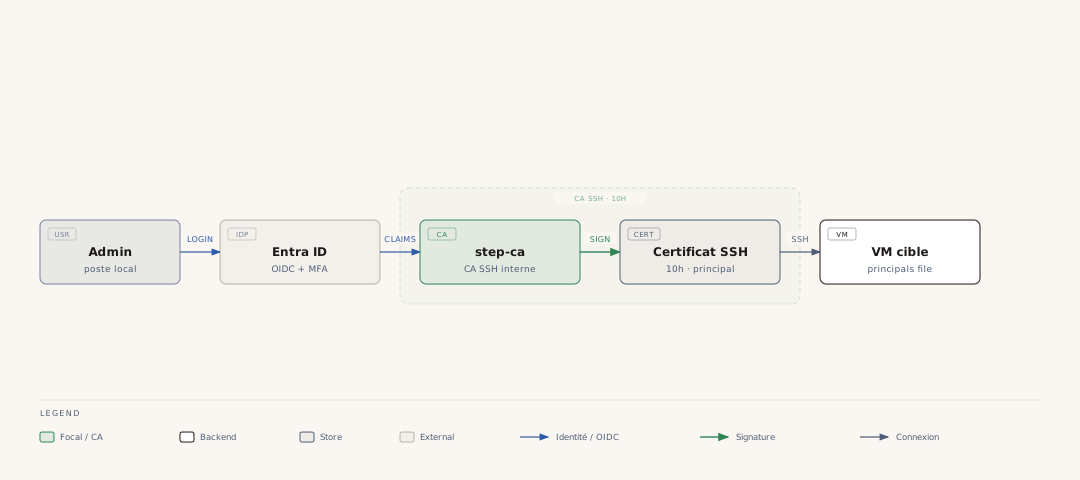
The design relies on step-ca, acting as an internal SSH certificate authority. To connect, an admin authenticates through an OIDC provisioner backed by Entra ID (with MFA), and receives in exchange a signed SSH certificate, valid for 10 hours.
export SSH_AUTH_SOCK=~/.ssh/step-agent.sock
ssh-add -l # should list an ECDSA-CERT key
The issued certificate carries principals (the identities the certificate is authorized to assume), and each VM on the fleet only accepts the expected principals, via AuthorizedPrincipalsFile /etc/ssh/auth_principals/%u.
Two cumulative group-membership gates condition issuance:
- the account's assignment to an Entra ID group,
- the
groupsfield configured on the step-ca provisioner side.
Both are required to get a certificate: either one alone isn't enough.
The point that really makes the difference with a static key: the principal written into the certificate comes from an OIDC token claim (the email address verified by Entra ID), not from an argument the user types on the command line. Concretely:
You can very well type admin@ on the command line, but the issued certificate carries the KeyID returned by Entra ID, typically [email protected], with its original casing. You can't fabricate an arbitrary principal just by typing something else: the identity provider decides, not the client.
Since a recent change, the SSH templates (ops.tpl, build.tpl) emit a second principal alongside the raw KeyID one: {{ toJson (lower .KeyID) }}, i.e. the address in lowercase (sprig's lower function, available since step-ca 0.30.2). Without it, an admin typing their address in lowercase could end up with a certificate whose principal matched nothing in AuthorizedPrincipalsFile, for lack of an exact case match. This second principal doesn't otherwise open any additional VM access: those files only list ops and the service account, never the address itself.
A static key still earns its keep, once
The first run on a brand new VM poses a chicken-and-egg problem: the VM doesn't trust the CA yet, so no certificate can be used to connect to it. The static key remains the only possible mechanism for this initial bootstrap:
ansible-playbook site.yml -u ops --private-key ~/.ssh/ops --limit new-vm.exemple.internal
Once this first run has gone through, ansible-pull takes over and switches everything to the certificate: the static key becomes useless again until the next new VM. This is a case where keeping a "legacy" mechanism in circulation, but deliberately confined to a single, well-identified step, is the right tradeoff rather than forcing an otherwise unsolvable chicken-and-egg problem.
The real surprise: a certificate-signed commit never triggers the "Verified" badge
This is the most counter-intuitive point of the entire migration, and the one I fortunately tested before enabling a branch protection rule: without that, it could have broken an entire pipeline.
Git forges (tested on Forgejo) verify SSH signatures by comparing against public keys registered on the account, not against a certificate authority. A commit signed by a perfectly valid SSH certificate, issued by a trusted CA, therefore never matches a public key known to the forge: the badge stays gray, even though the signature is cryptographically valid and verifiable on the command line.
$ git verify-commit HEAD
The command line confirms a perfectly valid signature. The web interface will never show a green lock for that commit.
Nothing in the forge's binary or documentation (checked on v15) lets you declare a CA as a trust root for signature verification on the interface side: ParseObjectWithSSHSignature only compares against registered public keys, explicitly excluding principals.
Never enable "require signed commits" as a branch protection for a team that signs via certificate rather than static key. The protection would block commits that are nonetheless legitimately signed and perfectly verifiable on the command line, just because the web interface doesn't know how to recognize them.
The real security check (the one that matters, on the deployment pipeline side) is still done on the command line with git verify-commit / git verify-tag, which works perfectly well with certificates via a cert-authority entry in allowed_signers:
# /etc/ansible/pull/allowed_signers
[email protected] ssh-ed25519 AAAA...   # personal static key
@cert-authority *.exemple.internal cert-authority ssh-rsa AAAA...   # step-ca CA
Any member of the ops group can therefore sign a deploy-* tag with their ephemeral certificate of the day, with no individual static key needed in this file (see the post on the signed GitOps pipeline for details on what this check protects, and what it doesn't).
Expiration doesn't retroactively break a signature
Another detail worth knowing before panicking mid-debug: git checks a certificate's validity at the moment the object was signed, not against the current time. A tag signed with a certificate that was still valid at the time remains verifiable months after that certificate expires.
Signing after expiration, on the other hand, fails immediately:
$ git tag -s deploy-2026-09-09-fix -m "deploy fix"
error: gpg.ssh.allowedSignersFile needs to be configured...
sign_and_send_pubkey: signing failed: agent refused operation
The reflex I ended up adopting on an unexpected signing error is simple: refresh the certificate (step ssh login) before digging further. Nine times out of ten, it's not a configuration regression: it's just a 10-hour certificate that expired while you were looking elsewhere.
A service account, minimal sudo
Beyond named accounts, a service account (svc-update) has its own dedicated JWK provisioner, with much shorter certificates (30 minutes) and strictly limited sudo:
svc-update ALL=(root) NOPASSWD: /usr/bin/dnf -y upgrade, \
                                 /usr/bin/apt-get update, \
                                 /usr/bin/apt-get -y dist-upgrade, \
                                 /usr/sbin/reboot
The principle stays the same as for human accounts: one identity, an explicit scope, a short validity window, just with a sudoers file trimmed to the strict minimum rather than full ops access.
What was deliberately left out
Every migration has angles it doesn't cover on the day you write about it:
- SSH host certificates (authenticating the server to the client, not just the reverse) aren't in place yet.
- Cross-checking identity provider identifiers against verified addresses on the Git forge side, for every team account, still needs to be done systematically rather than case by case.
A well-designed zero-trust architecture remains an ongoing effort, not a state you reach and finish one day.
What I take away from this
The most useful part of this migration isn't the OIDC → step-ca architecture itself (fairly well documented elsewhere) but the friction points no doc mentions: an interface badge that will never follow a CA-based trust model, a KeyID casing issue capable of silently breaking access, a certificate expiration that doesn't invalidate anything retroactively. These are exactly the kind of details that, left untested before enabling a strict protection, turn into a production incident instead of a line of documentation.